ASSISTANTS IN THE COMPANY
AI assistants for reliable results
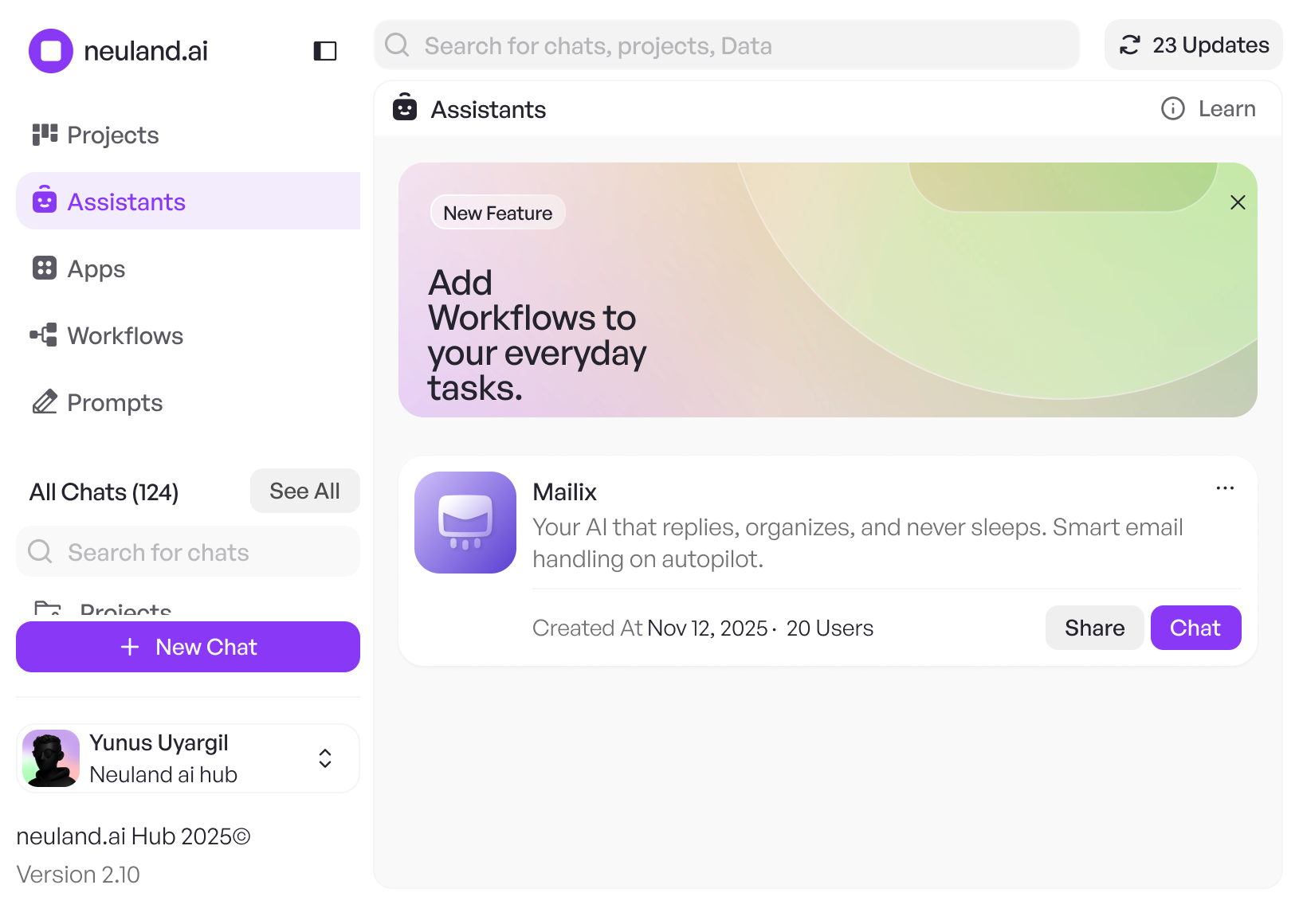
Assistants are fixed-configured AI roles that work with your company knowledge and reliably perform tasks according to the same specifications. Ideal for recurring activities, clear standards, and consistent results.
Assistants are fixed-configured AI roles that work with your corporate knowledge and reliably perform tasks according to the same guidelines.
Ideal for recurring tasks, clear standards, and consistent results.
7 days of free access to
neuland.ai HUB
Creates texts, campaign ideas, and formulations according to brand guidelines
Virtual Marketing Manager (m/f/d)
(HUB Assistant)
Creates texts, campaign ideas, and formulations according to brand guidelines
Virtual Marketing Manager (m/f/d)
(HUB Assistant)
Checks and prepares travel expense reports according to internal guidelines
Travel Expense Auditor (m/f/d)
(HUB Assistant)
Checks and prepares travel expense reports according to internal guidelines
Travel Expense Auditor (m/f/d)
(HUB Assistant)
Summarizes reports, memos, and decision-making foundations concisely.
CEO Briefing Bot
(HUB Assistant)
Summarizes reports, memos, and decision-making foundations concisely.
CEO Briefing Bot
(HUB Assistant)
Checks processor agreements for completeness and risks.
Contract auditor AVV (m/f/d)
(HUB Assistant)
Checks processor agreements for completeness and risks.
Contract auditor AVV (m/f/d)
(HUB Assistant)
Answers questions about HR policies, benefits, and processes
HR Knowledge Navigator (m/f/d)
(HUB Assistant)
Answers questions about HR policies, benefits, and processes
HR Knowledge Navigator (m/f/d)
(HUB Assistant)
Consolidated market and competition information
Strategy Sparring Partner (m/f/d)
(HUB Assistant)
Consolidated market and competition information
Strategy Sparring Partner (m/f/d)
(HUB Assistant)
Writes emails in the company-specific style
Corporate Mail Writer
(HUB Assistant)
Writes emails in the company-specific style
Corporate Mail Writer
(HUB Assistant)
Creates structured summaries from meetings
Meeting Recap Generator
(HUB Assistant)
Creates structured summaries from meetings
Meeting Recap Generator
(HUB Assistant)
Analyzes reports and presents key figures clearly
Financial Analysis Assistant (m/f/d)
(HUB Assistant)
Analyzes reports and presents key figures clearly
Financial Analysis Assistant (m/f/d)
(HUB Assistant)
Supports questions related to systems, interfaces, and architecture
IT Documentation Guide
(HUB Assistant)
Supports questions related to systems, interfaces, and architecture
IT Documentation Guide
(HUB Assistant)
Suports new employees with structured corporate knowledge
Onboarding Coach
(HUB Assistant)
Suports new employees with structured corporate knowledge
Onboarding Coach
(HUB Assistant)
Answers frequently asked questions from internal knowledge sources.
Internal FAQ Bot
(HUB Assistant)
Answers frequently asked questions from internal knowledge sources.
Internal FAQ Bot
(HUB Assistant)
Supports with GDPR questions and internal guidelines
Data Protection Navigator (m/f/d)
(HUB Assistant)
Supports with GDPR questions and internal guidelines
Data Protection Navigator (m/f/d)
(HUB Assistant)
Analyzes tenders and structures requirements
Tender Analyst (m/f/d)
(HUB Assistant)
Analyzes tenders and structures requirements
Tender Analyst (m/f/d)
(HUB Assistant)
Answers questions about products, variants, and specifications
Product Knowledge Manager (m/f/d)
(HUB Assistant)
Answers questions about products, variants, and specifications
Product Knowledge Manager (m/f/d)
(HUB Assistant)
Creates status reports from project information
Project Status Reporter
(HUB Assistant)
Creates status reports from project information
Project Status Reporter
(HUB Assistant)
Formulates announcements, updates, and newsletters
Internal communication support
(HUB Assistant)
Formulates announcements, updates, and newsletters
Internal communication support
(HUB Assistant)
Assist support teams with quick, consistent answers
Support Knowledge Assistants (m/f/d)
(HUB Assistant)
Assist support teams with quick, consistent answers
Support Knowledge Assistants (m/f/d)
(HUB Assistant)
AI agents with real added value
AI assistants that reliably complete tasks
Stably configured
Assistants work according to fixed specifications and deliver consistent results regardless of who uses them.
This leads to reliable answers company-wide without having to formulate new prompts each time.
Commonly usable
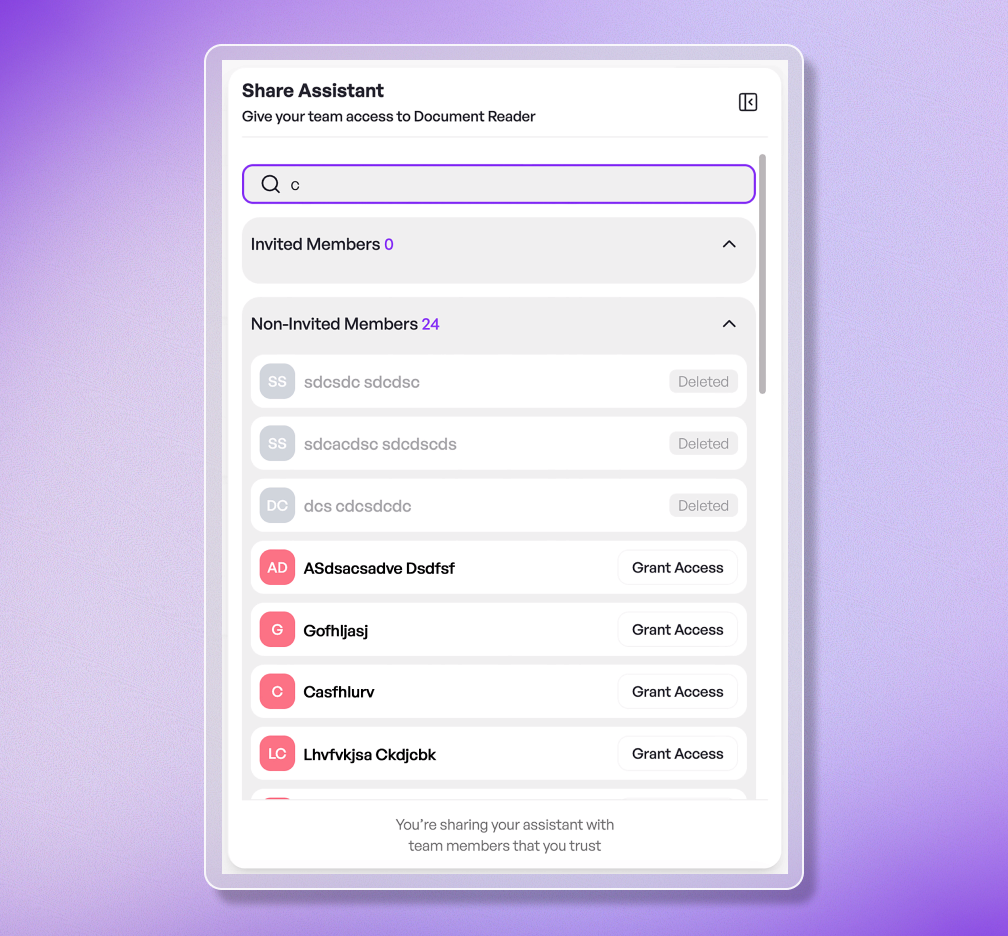
Once created, assistants can be shared with colleagues, teams, or the entire company.
Everyone works with the same logic and on the same knowledge base.
Seamlessly connected to your systems
The HUB can be directly connected to your business tools and "talks" with their content.
Complex system landscapes and legacy systems can also be integrated.



This is how assistants work in the neuland.ai HUB
This is how assistants work in the neuland.ai HUB
step 1
Define role
Clearly define what task the assistant should take on, including behavior, tone, and output formats.
step 2
Assign knowledge
Link relevant documents, policies, or data collections that the assistant should use for its work.
step 3
Check results
Test the assistant with real content and ensure that responses, tone, and output formats meet your requirements.
step 4
Share in the company
Make the assistant available to colleagues, teams, or the entire organization and use it for recurring tasks.
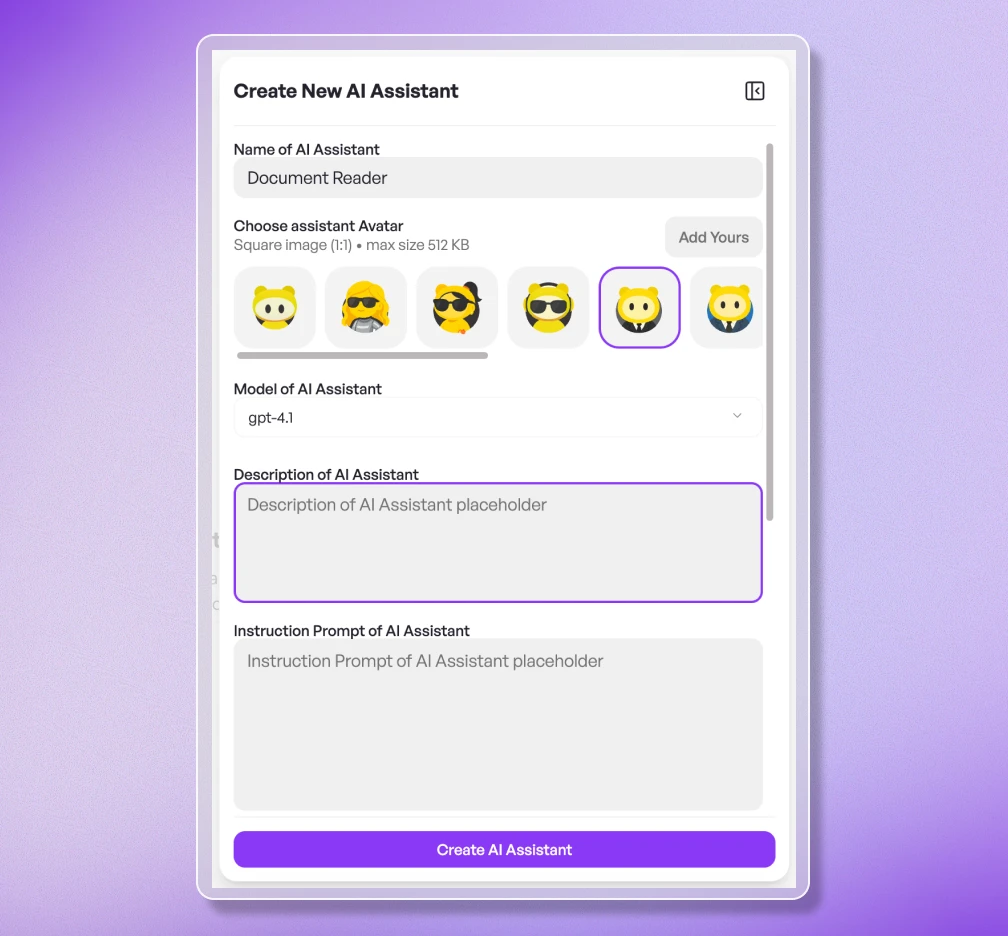
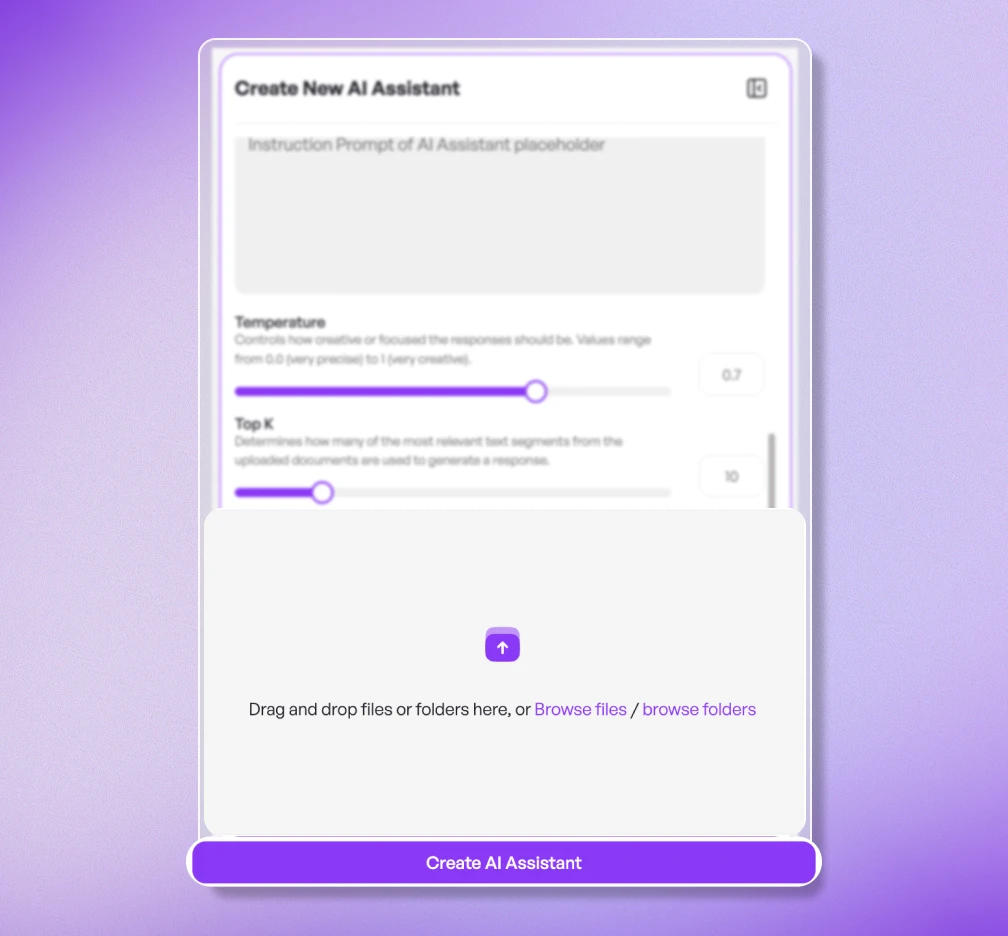
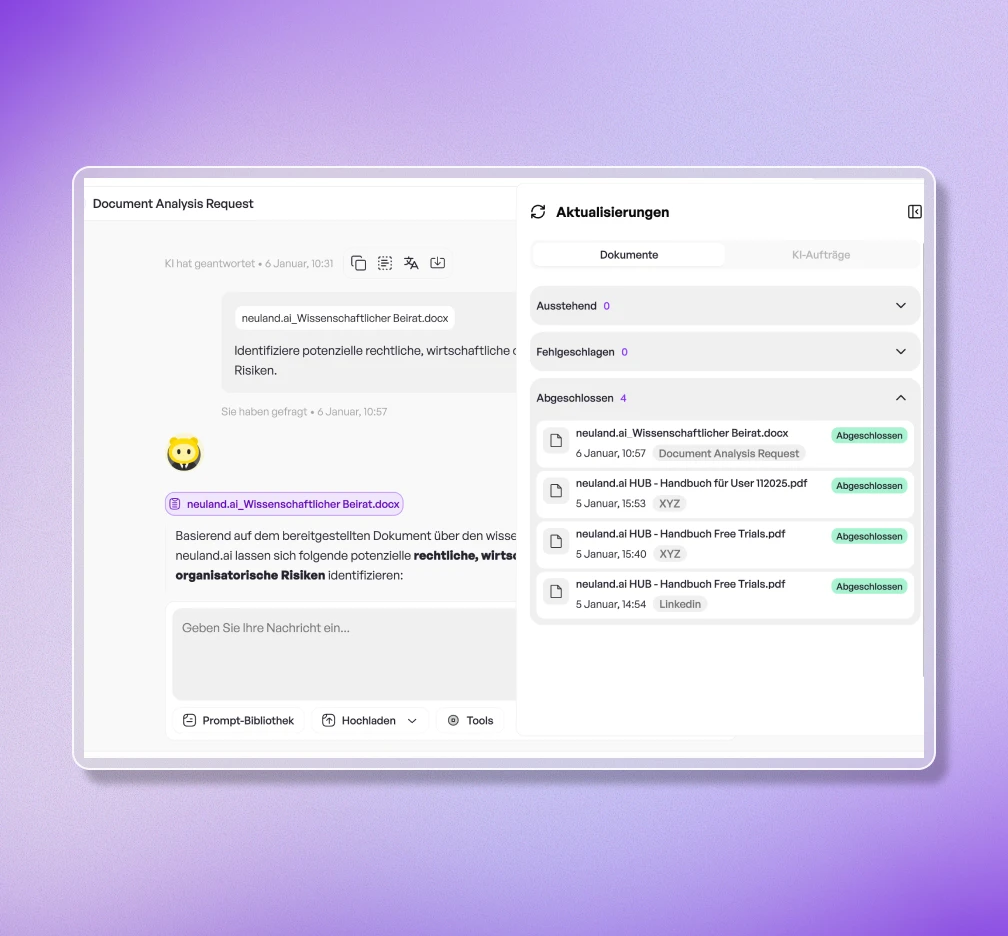
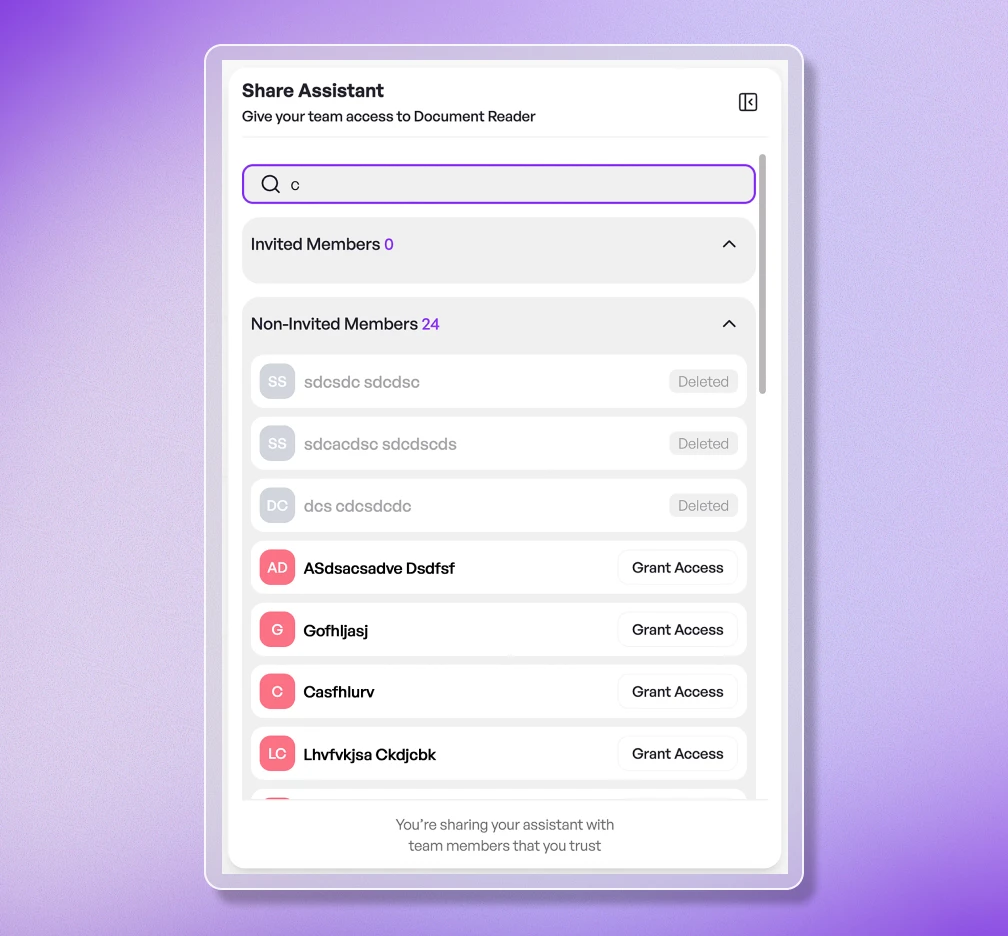
step 1
Define role
Clearly define what task the assistant is supposed to take on, including behavior, tone, and output formats.
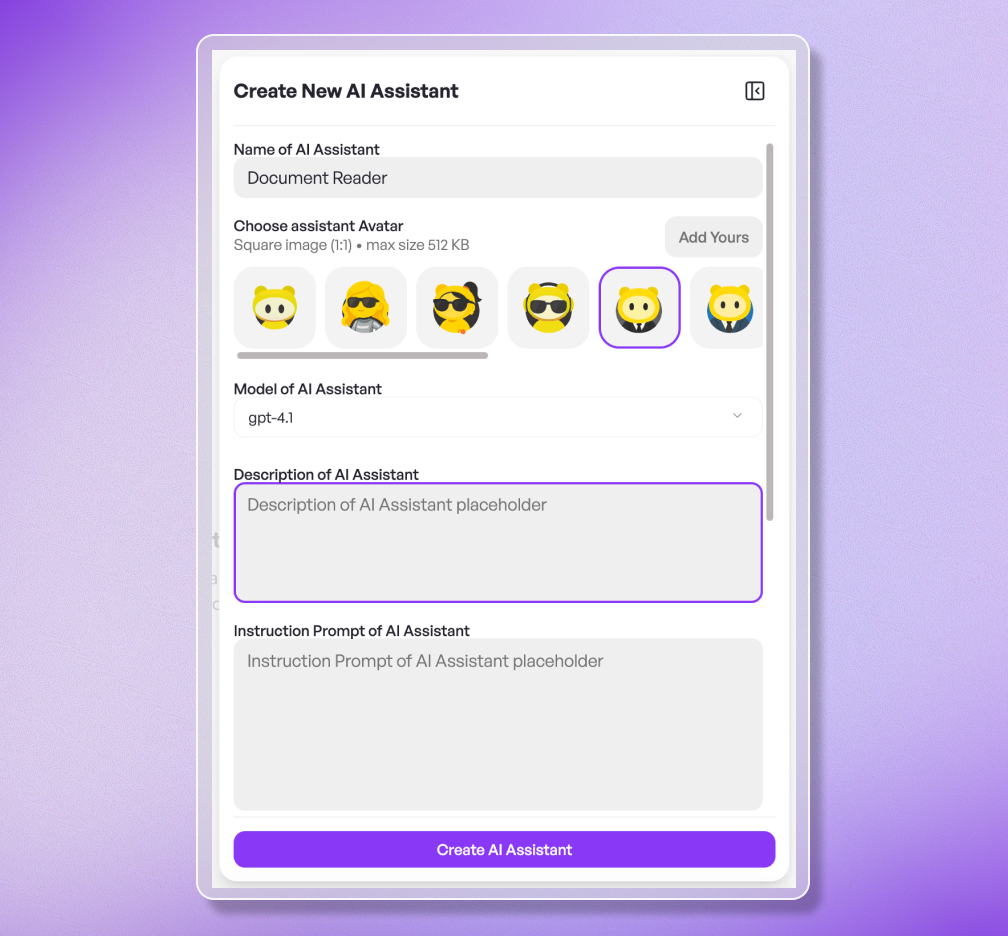
step 2
Assign knowledge
Link relevant documents, policies, or data collections that the assistant should use for its work.

step 3
Check results
Test the assistant with real content and ensure that responses, tone, and output formats meet your requirements.
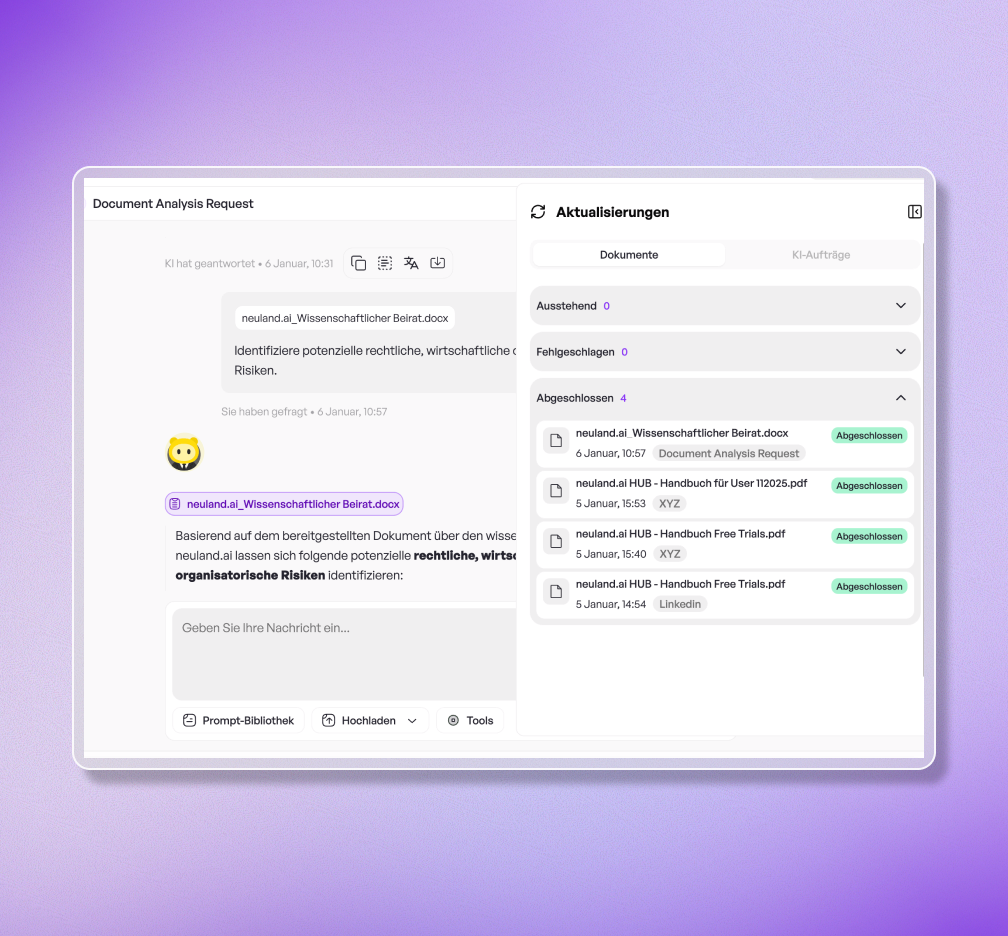
step 4
Share in the company
Make the assistant available to colleagues, teams, or the entire company and use it for recurring tasks.